Part 2 · New enquiries

×

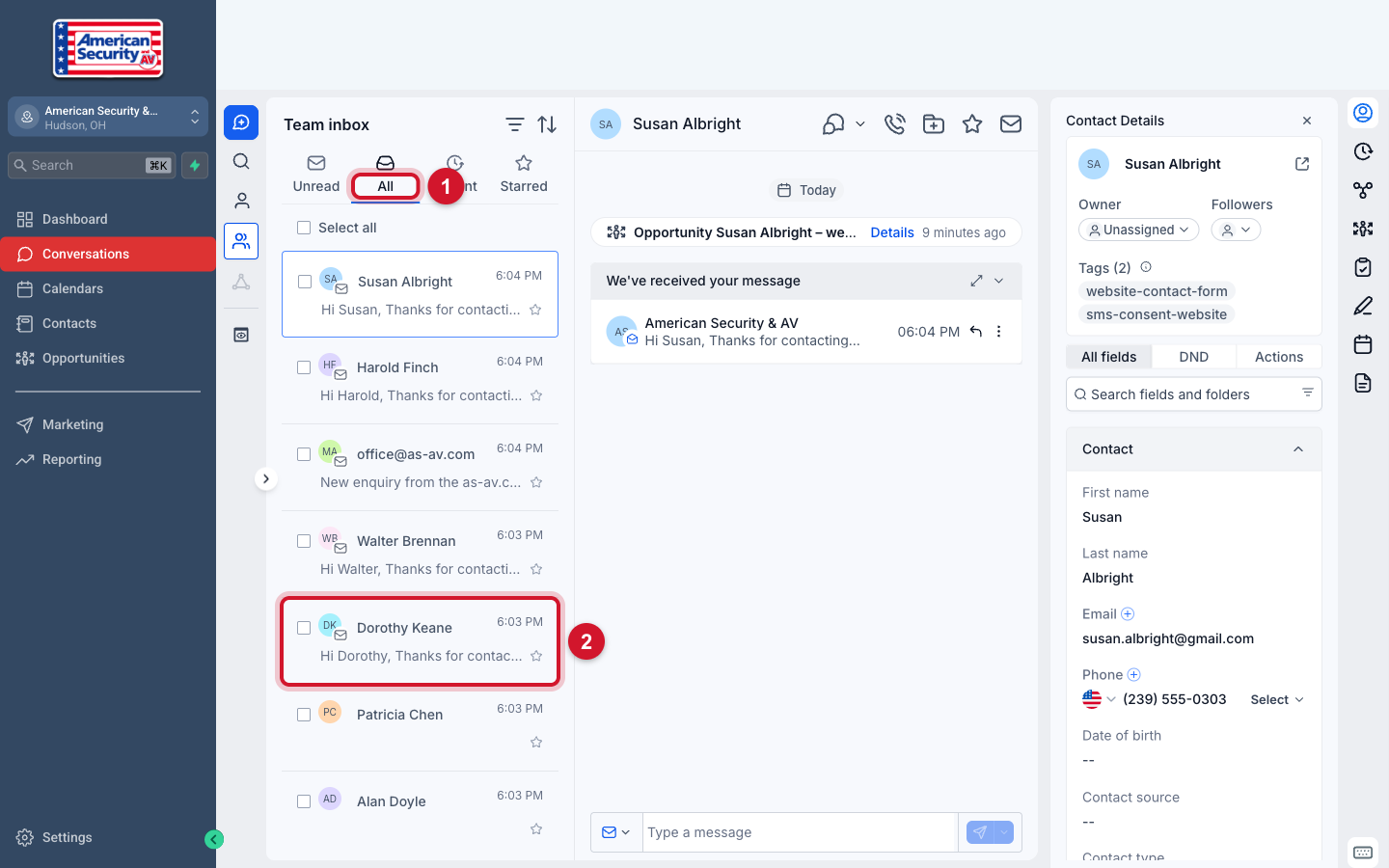
Find the new enquiry
Click
Conversations
in the menu.
1
Click
All
so you see every conversation.
2
Click the
customer’s name
. Newest is at the top.
Good to know
You also get an email alert for every new website enquiry. Please reply here, not from Outlook, so the whole team can see the answer.
1 Menu
2 Enquiries
3 Customers
4 Sales board
5 Service
6 Boards
7 Email
8 Mailchimp
9 Monday
10 Every day
Step 1 of 7
6
← Back
Part 2 · Page 6 of 137
Jump to…
Start
Before you start
Your menu
New enquiries & replies
New enquiries
Replying
Follow-ups
Your customers
Labels (tags)
Saved lists
The sales board
Working a job
The sales board
Service & billing
Changing the boards
A new board
Emailing customers
Who gets the email
Emailing customers
Your Mailchimp list
Out of Mailchimp
Importing
Moving from Monday
A · One board to Excel
B · Everything, with prints (admin)
C · Prints for one job
Set up the CRM (once)
Convert the Monday file
Import the jobs
Add the prints
Every day & getting help
Every day
Words to know
If something goes wrong
Getting help
Contents
Next →