Part 4 · The sales board

×

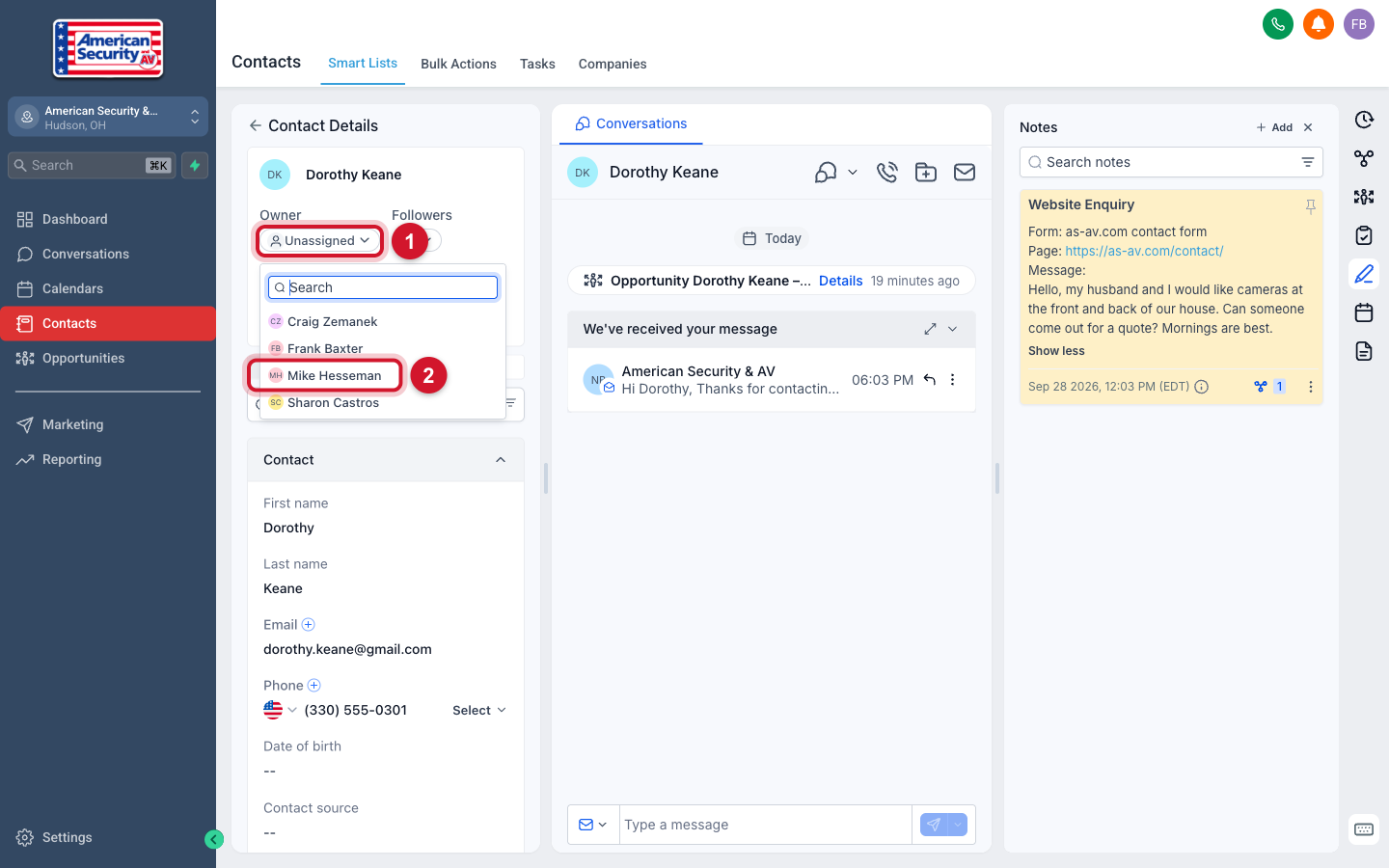
Give a lead to a salesperson
1
On the customer’s page, click
Owner
.
2
Click the
salesperson’s name
.
Then open the job card and set the same
Owner
there too (see “Open a job”).
Careful
Salespeople only see the customers and jobs given to them. Set the owner in
both places
, or they will not see it.
1 Menu
2 Enquiries
3 Customers
4 Sales board
5 Service
6 Boards
7 Email
8 Mailchimp
9 Monday
10 Every day
Step 13 of 13
34
← Back
Part 4 · Page 34 of 137
Jump to…
Start
Before you start
Your menu
New enquiries & replies
New enquiries
Replying
Follow-ups
Your customers
Labels (tags)
Saved lists
The sales board
Working a job
The sales board
Service & billing
Changing the boards
A new board
Emailing customers
Who gets the email
Emailing customers
Your Mailchimp list
Out of Mailchimp
Importing
Moving from Monday
A · One board to Excel
B · Everything, with prints (admin)
C · Prints for one job
Set up the CRM (once)
Convert the Monday file
Import the jobs
Add the prints
Every day & getting help
Every day
Words to know
If something goes wrong
Getting help
Contents
Next →