Part 3 · Saved lists

×

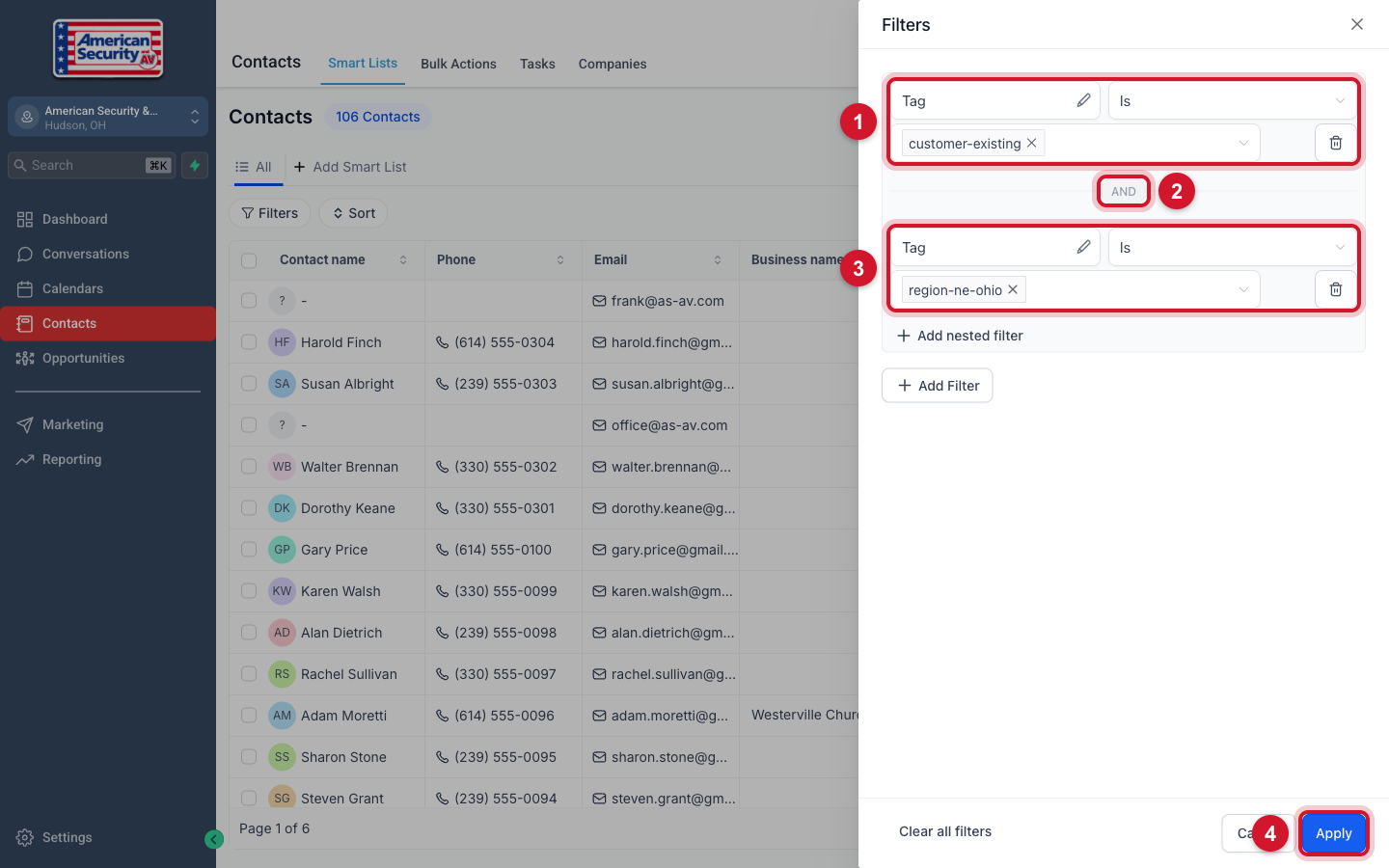
Make a list you use often
1
Click
Filters
, choose
Tag
, and pick the first label.
2
AND
means the customer must have both labels.
3
Add the second label with
Add nested filter
.
4
Click
Apply
.
Good to know
“Add Filter” gives OR (either label). “Add nested filter” gives AND (both labels).
1 Menu
2 Enquiries
3 Customers
4 Sales board
5 Service
6 Boards
7 Email
8 Mailchimp
9 Monday
10 Every day
Step 5 of 7
18
← Back
Part 3 · Page 18 of 137
Jump to…
Start
Before you start
Your menu
New enquiries & replies
New enquiries
Replying
Follow-ups
Your customers
Labels (tags)
Saved lists
The sales board
Working a job
The sales board
Service & billing
Changing the boards
A new board
Emailing customers
Who gets the email
Emailing customers
Your Mailchimp list
Out of Mailchimp
Importing
Moving from Monday
A · One board to Excel
B · Everything, with prints (admin)
C · Prints for one job
Set up the CRM (once)
Convert the Monday file
Import the jobs
Add the prints
Every day & getting help
Every day
Words to know
If something goes wrong
Getting help
Contents
Next →